Receipts, shopping list and Apple Watch
Your shopping list writes itself.
Gila Receipt Tracker reads every line of your receipts and remembers what you paid at each store. It builds your shopping list from what you buy, syncs it to your Apple Watch, and shows you where you paid too much and where it was cheaper.
Coming soon to iPhone and Android
Shopping list
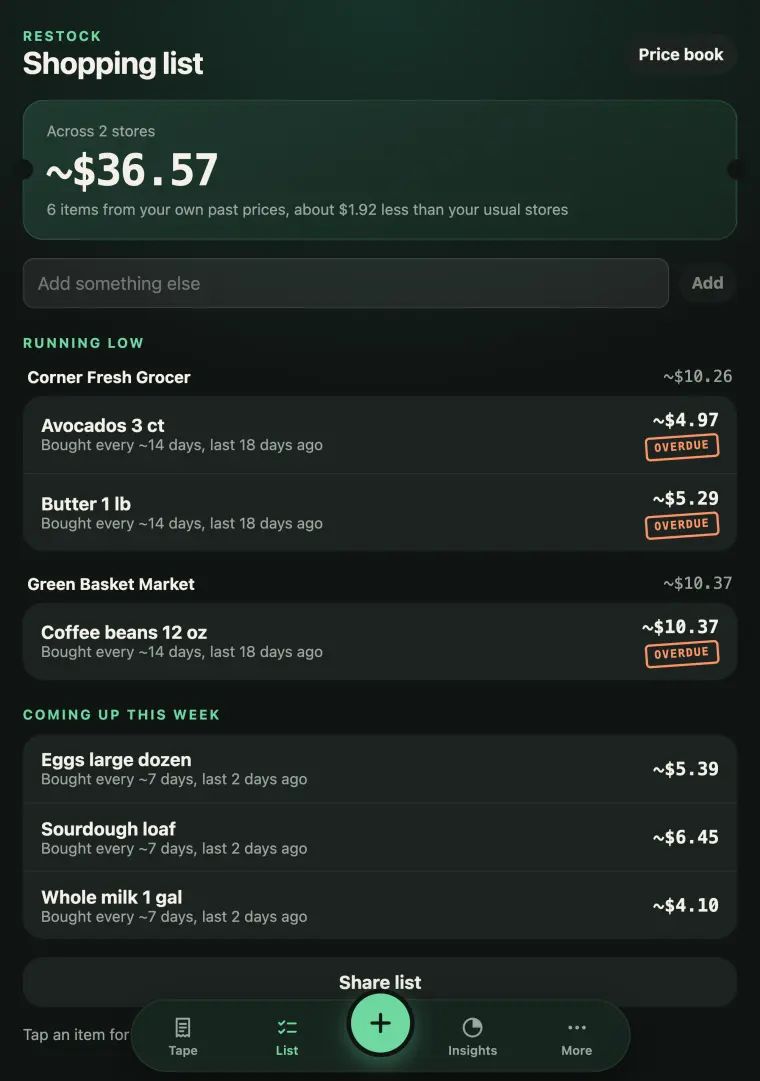
A shopping list that writes itself
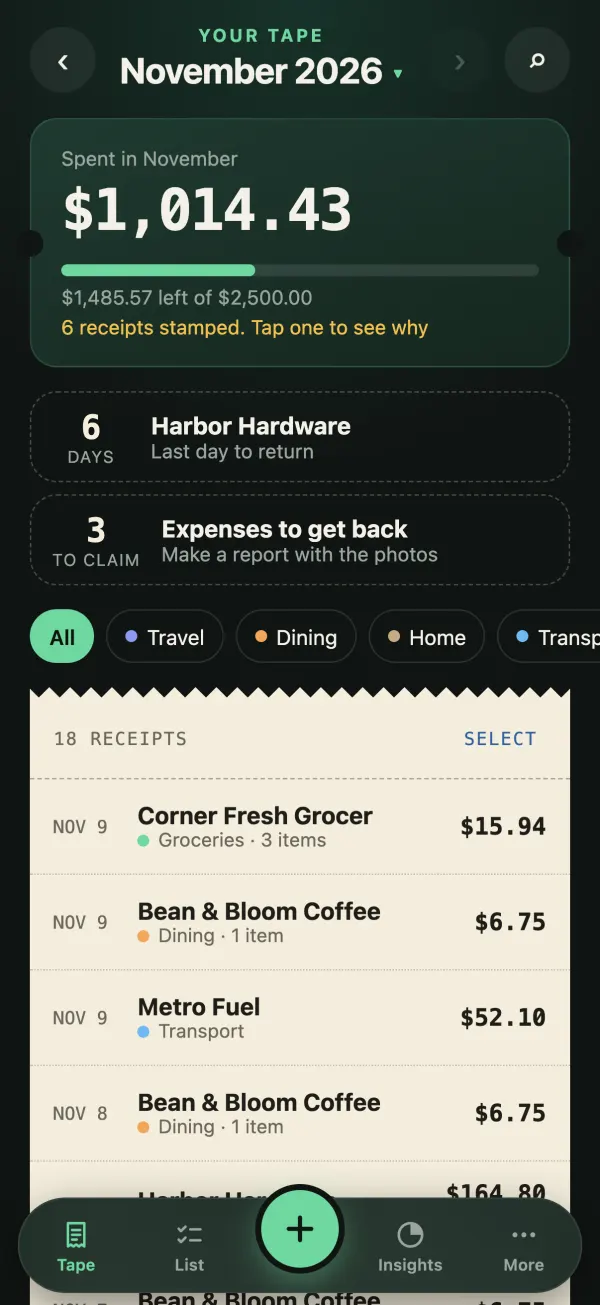
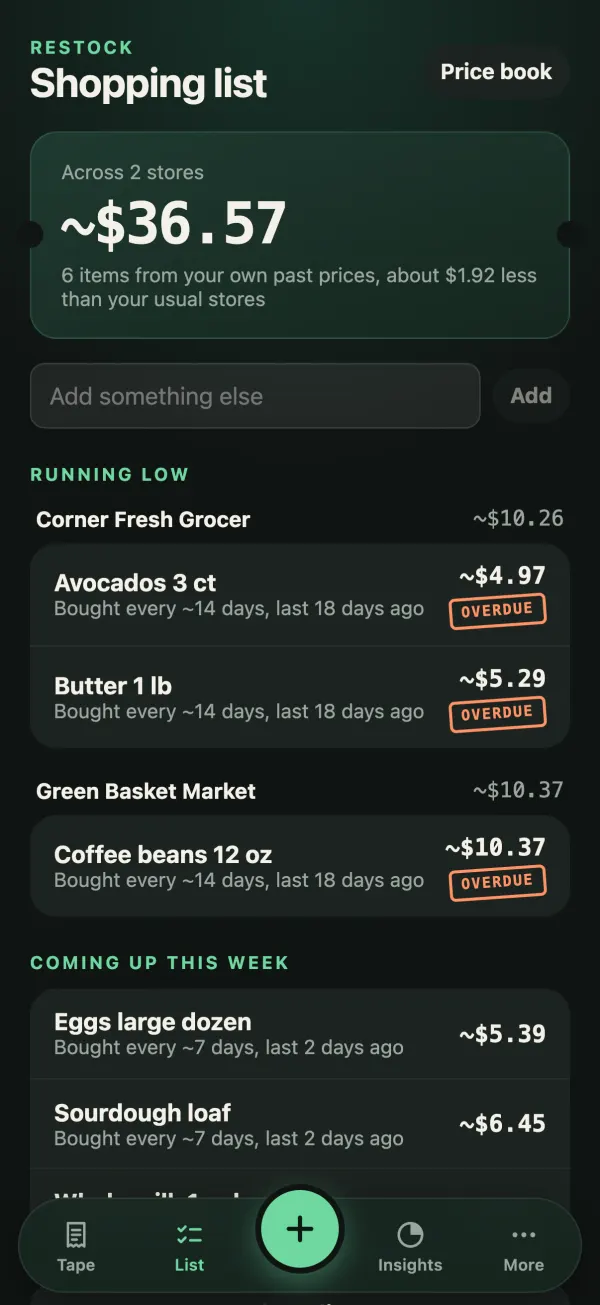
The app learns how often you buy groceries and household items, then suggests what’s probably running low, grouped by the store where each was cheapest.
- Every suggestion says why it’s there, like “Bought every ~14 days, last 17 days ago”
- Tap an item for Got it, Snooze or Not buying this
- Add your own items and share the list
- At most one restock reminder a week
Apple Watch
The list on your wrist
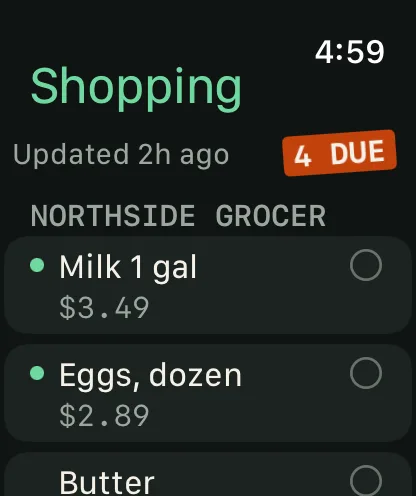
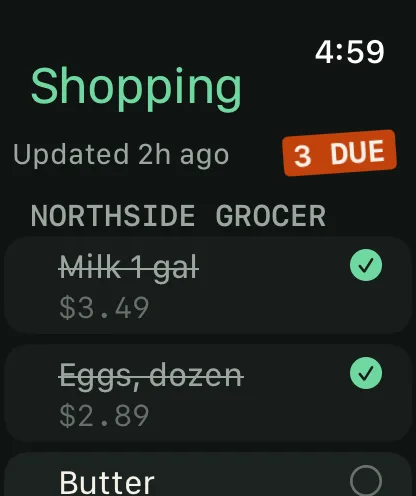
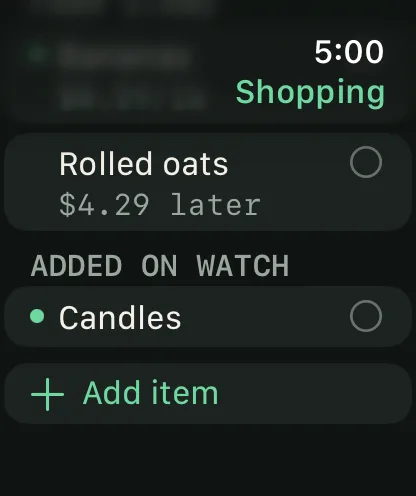
Leave the phone in your pocket. Your shopping list is on your Apple Watch, and it works offline, so it’s there in the aisle with no signal.
- Tick items off as you go
- Add an item by dictation
- A complication shows how many items are due
The list travels between your own iPhone and Watch. Nothing goes to us.
What it does
Everything on one tape
Scan a paper receipt, pick a photo or type it in. The app does the reading and the remembering.
- 01Price memoryEvery line item is matched against your earlier receipts.+31%
- 02Cheaper elsewhereSee the cheapest store you’ve bought each item at.Cheaper
- 03Mistakes caughtCharged twice, totals that don’t add up, unusual tax or tips.Charged twice?
- 04A shopping list that writes itselfSuggests what’s running low, grouped by the cheapest store, and says why.Overdue
- 05Apple WatchYour list on your wrist, even offline. Tick items off or dictate a new one.4 due
- 06Insights and tipsWhere the money goes, what looks too expensive, and ways to spend less.Pricey
- 07CalendarAny month or year at a glance. Jump back to last November.Nov
- 08Scanning that copesLong receipts read in full, several at once, discounts and tips handled.Read
- 09Find in screenshotsFinds order confirmations among the screenshots already on your phone.Found
- 10Claims and PDF expense reportsMark work receipts, send a report, track it until you’re paid back.To claim
- 11Return and warranty remindersDeadlines on the tape, with a reminder before they pass.6 days
- 12iPad and the iPhone foldableLaid out for the bigger screen, in landscape too.Fits
Price memory
It remembers what you paid, so you don’t have to
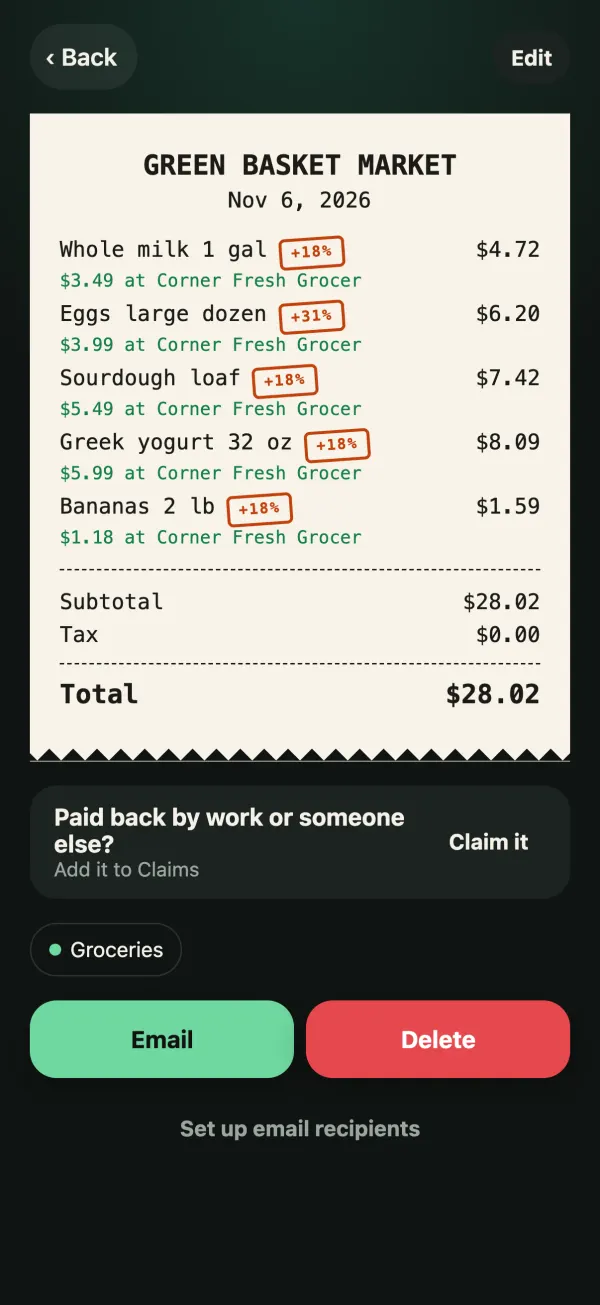
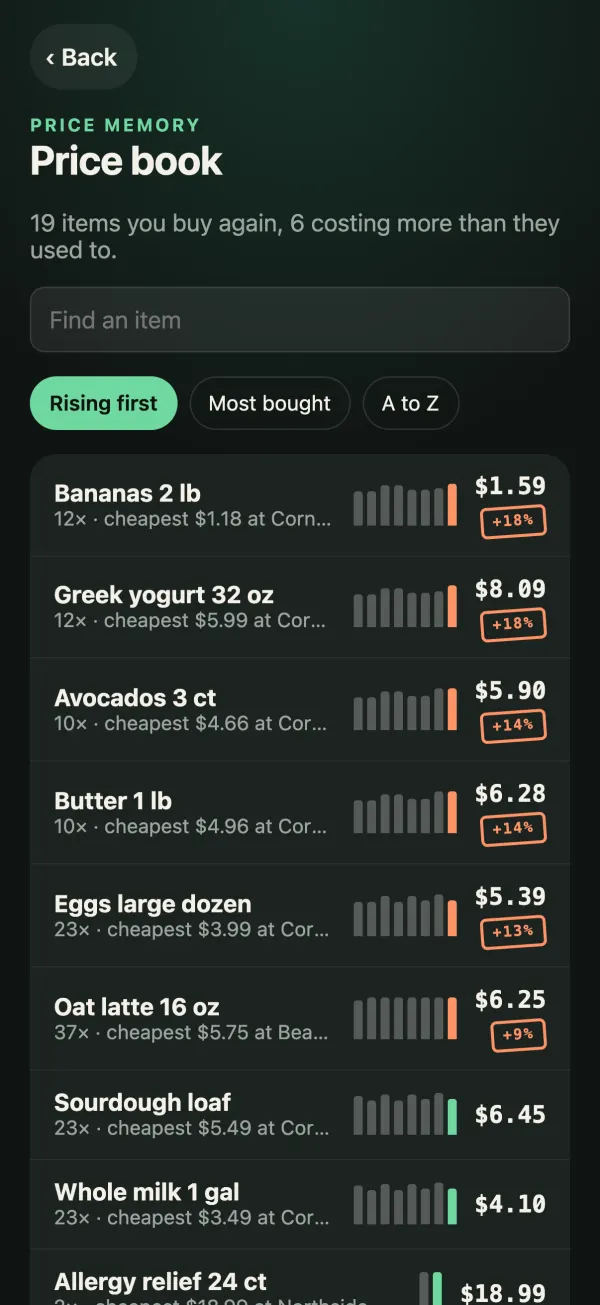
Every line item is matched against your earlier receipts. When something costs more than usual it gets a stamp, and the receipt shows where the same item was cheaper.
- Price rises stamped on the receipt, like +18%
- The cheapest store you’ve bought each item at
- A Price book of everything you buy again, with its price history
Mistakes caught
A second pair of eyes on every receipt
Tills make mistakes. The app checks each receipt as it reads it and tells you, plainly, when something is worth a look.
- The same item charged twice
- Totals that don’t add up to the items
- Unusual tax or tips
- Receipts that look expensive for their category
Northside Pharmacy
Nov 5, 2026
Worth a look
“Allergy relief 24 ct” is on here twice at the same price. Worth checking you weren’t charged twice.
Drawn from the app’s receipt screen, with sample data.
Insights and tips
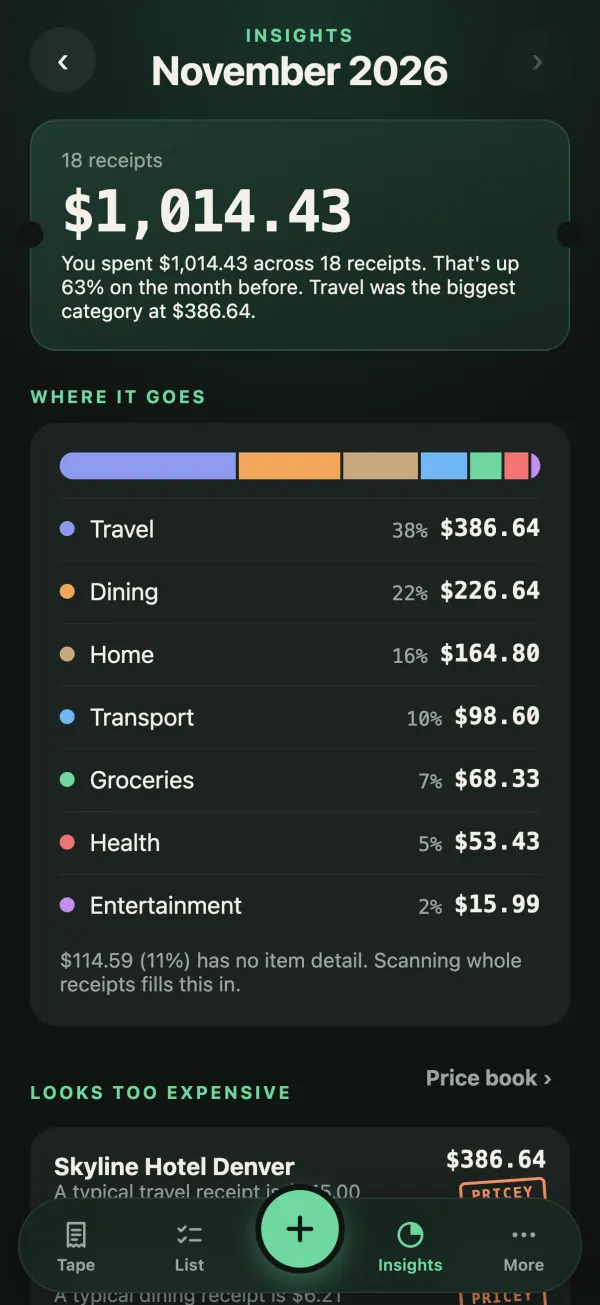
Where the money goes, and how to keep more of it
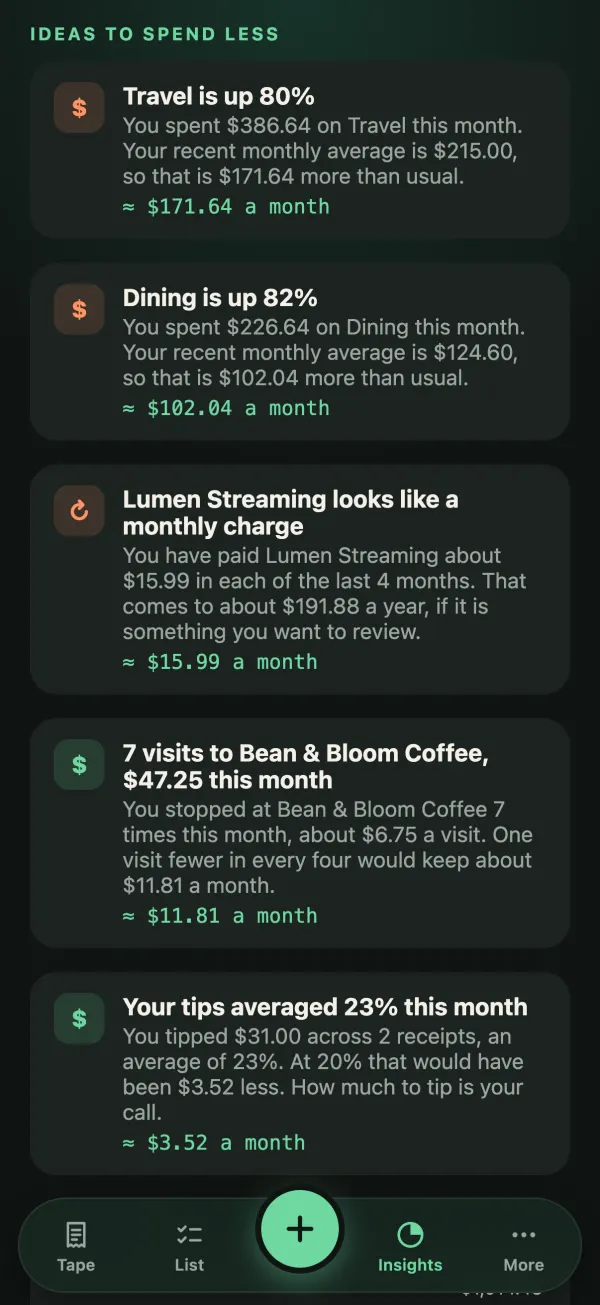
Your month as one receipt tape with its total, broken down by category, then store, then item. Then plain tips to spend less, worked out from your own numbers.
- What looks too expensive, stamped Pricey
- Rising categories, repeat monthly charges and frequent small buys
- On supported iPhones, Apple Intelligence writes personal tips on the device and answers questions like “How much on coffee since June?”
Apple Intelligence tips and questions are part of the one-time unlock.
Calendar
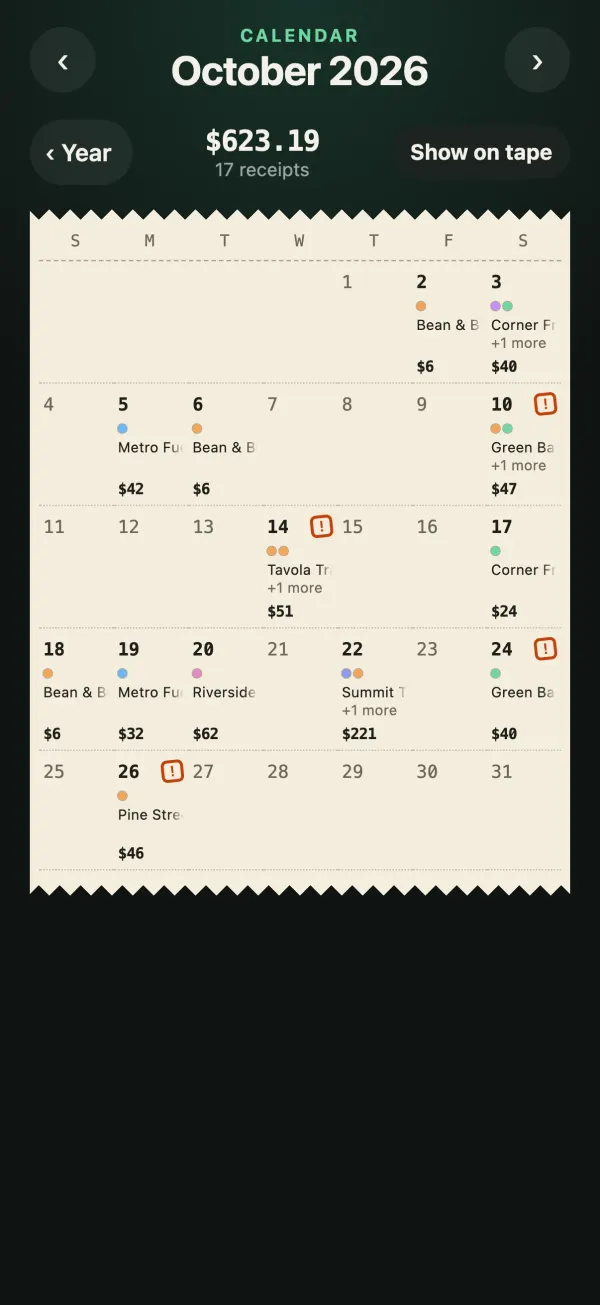
Any month, any year, at a glance
Each month is a calendar printed on the till roll: which days you shopped, where, and how much. Step out to the whole year, then jump straight back to last November.
- Every day shows its receipts and total
- Days with a stamped receipt are flagged
- Tap a day to open its receipts, or show the month on the tape
Adding receipts
Scanning that copes with real receipts
Scan paper, pick photos or type one in. The awkward ones are handled too.
- Long receipts are read in full
- Add another part of a long receipt to the same one
- Scan several receipts at once and review each
- Store discounts, like warehouse-club coupons, are applied to their items
- Tips are captured
Warehouse Club
Scanned in two parts
Discount on its item
The coupon further down the receipt is taken off the paper towels, so price memory keeps what you really paid: $17.99.
Illustration with sample data.
Bigger screens
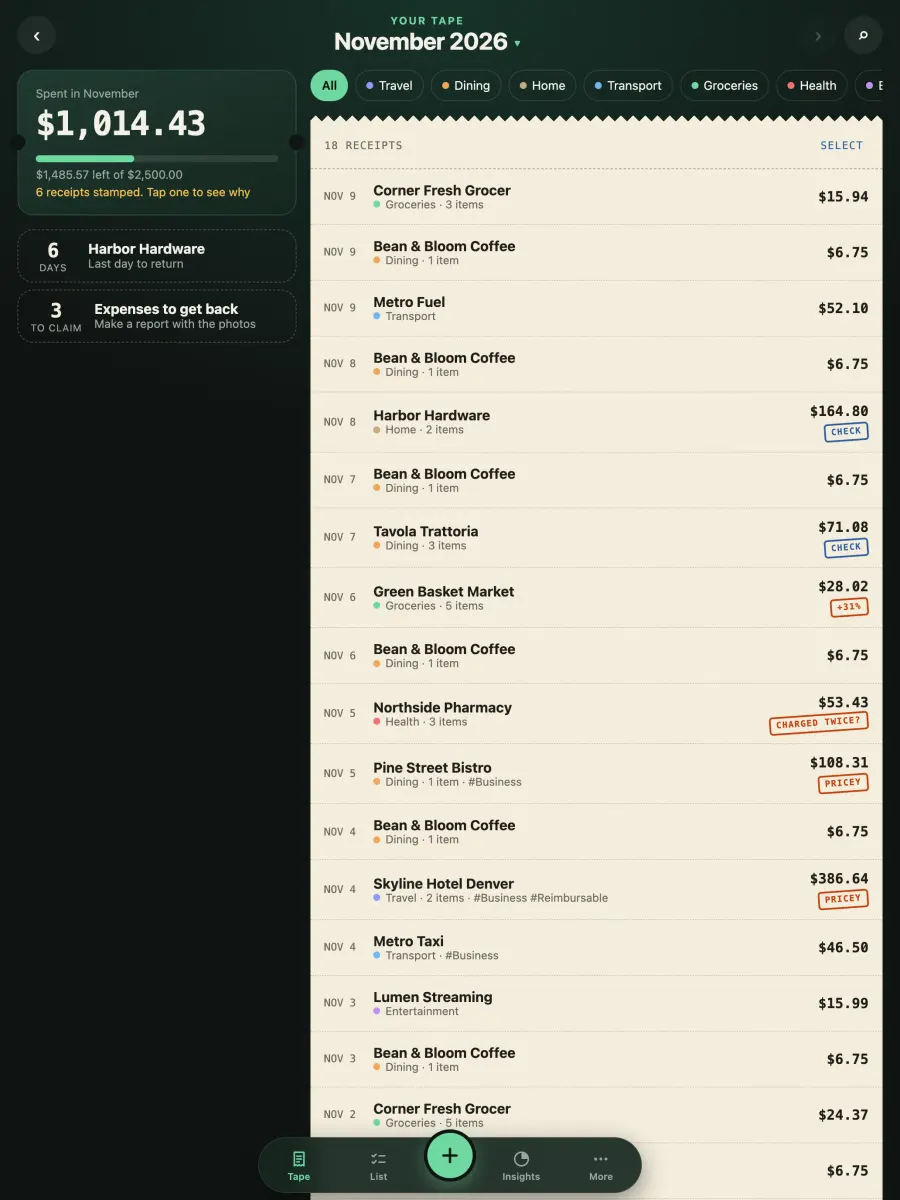
On iPad and the iPhone foldable, too
The layout opens up when there’s room, with the month beside the tape. It works in landscape as well.
Getting money back
Claims, without the shoebox
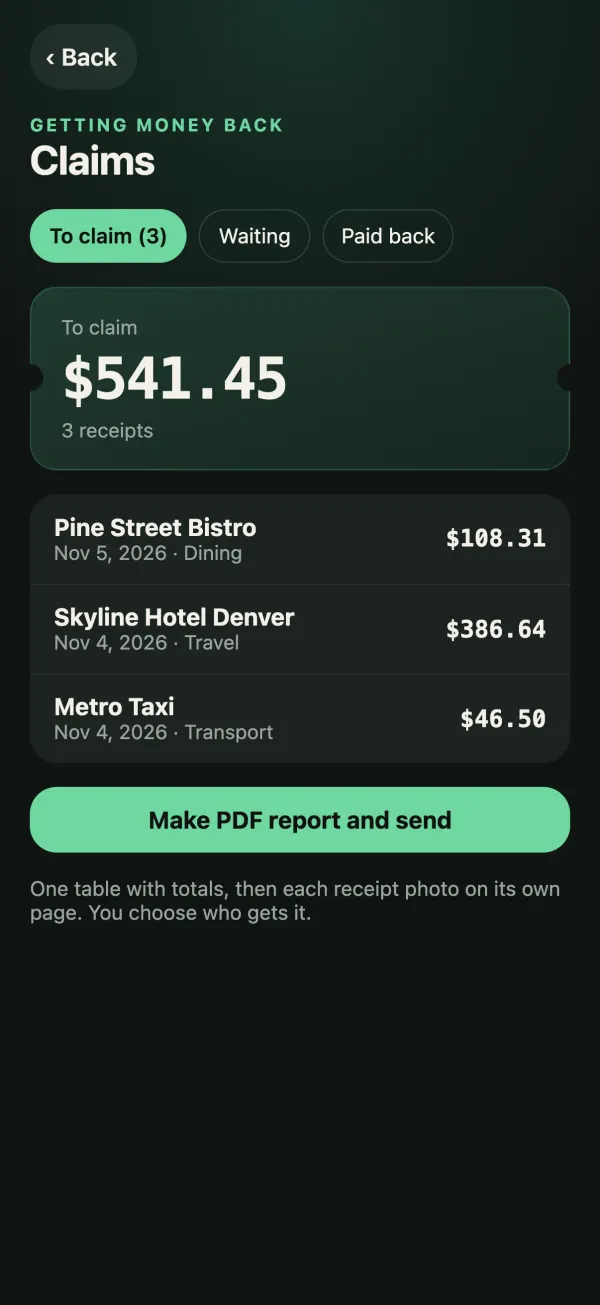
Mark the receipts work or someone else owes you for. When you’re ready, send one PDF expense report and track each claim until it’s paid back.
- A PDF report with a table, totals and every photo, built on your phone
- You choose who gets it
- Each claim tracked from sent to paid back
PDF expense reports are part of the one-time unlock.
Find in screenshots
Bought something online and screenshotted the confirmation? With your permission, the app reads your recent screenshots on the device and finds the receipts and order confirmations. Only the ones you choose are added.
Return and warranty reminders
Return windows and warranty deadlines sit at the top of your tape as countdowns, and a reminder arrives before they pass.
Yours, privately
Your receipts stay on your phone
Accounts
No account and no sign-in. We don’t know who you are.
Uploads
Receipts are read on your device, with Apple Intelligence on supported iPhones and built-in text recognition on others. Nothing is uploaded to us or to any AI service.
Owner: you
Optional sync through your own iCloud. Export everything as a ZIP or spreadsheet whenever you like.
The details are in the Privacy Policy, including what the free version’s ad banner and our crash reports do and don’t collect.
Free or one payment
Free, or pay once. No subscription.
Free
$0
For as long as you like
Shows a small banner ad that doesn’t track you.
Unlock
1×
One payment, yours to keep
No subscription
The price is shown in the app and in your store before you buy. Apple Intelligence needs a supported iPhone. iCloud sync is for iPhone.
Support
Common questions
The short version: there is no account, and everything stays on your device.
Do I need an account?
No. There is no account and no sign-in, and everything stays on your device. Sync is optional and runs through your own iCloud.
Are my receipts uploaded anywhere?
No. Receipts and photos are read and stored on your device, and nothing is sent to us or to any AI service. If you turn on iCloud sync, they are saved in your own iCloud. See the Privacy Policy.
What does the free version include?
The free version reads 10 receipts a month and shows a small banner ad that doesn’t track you. A one-time purchase removes ads and adds unlimited scans, Apple Intelligence tips and questions, PDF expense reports, saved email recipients and iCloud sync. There is no subscription.
Do I need Apple Intelligence?
No. Receipts are read with Apple Intelligence on supported iPhones and with built-in text recognition on others. Price memory, mistake checks and the tips worked out from your own numbers don’t depend on it.
Does the shopping list work on Apple Watch?
Yes. The list is on your wrist and works offline. You can tick items off, add one by dictation, and put a complication on your watch face that shows how many items are due. The list travels between your own iPhone and Watch, and nothing goes to us.
How do I move to a new phone?
On iPhone, use iCloud sync or Restore from iCloud in Settings. To move between iPhone and Android, choose Export everything to create a ZIP file, then import it on the new phone.
How do I delete my data?
See Deleting your data.
Need help or found a problem?
Email us and we’ll get back to you. In the app, you can also go to Settings and choose Report it.
Start remembering prices
Coming soon to iPhone and Android